

Gartner projects that 70% of all new enterprise applications will be built using no-code or low-code tools by 2026, a market now worth $44.5 billion. Bubble.io didn’t create this shift, but it’s been at the center of it. Since 2012, the platform has grown from a bootstrapped experiment into the no-code tool most serious web app builders reach for first. More than 4.69 million apps have been built on it worldwide.
But 2026 is a different year. A wave of AI-first builders (Lovable, Base44, Bolt.new) now promise working web and mobile apps from a single sentence in under two minutes. That changes the question you’re really asking — not just “what is Bubble.io?” but “should I bother learning a full web and mobile app development platform when faster tools exist?”
This guide answers both.
What Bubble.io Actually Is?
Bubble.io is a full-stack visual development platform for building web applications and native mobile apps without writing code. Not a website builder. Not a template system. A complete app development environment where you design the front-end interface, build the backend programming logic, and manage the relational database — all through a visual drag-and-drop editor that outputs production-ready web apps and, since mid-2025, native iOS and Android mobile applications.
That distinction matters. Webflow builds marketing sites. Glide turns spreadsheets into simple apps. Bubble builds products: web-based client portals, SaaS platforms, marketplaces, internal tools, B2B dashboards, and — since 2025 — native iOS and Android mobile apps, all from the same visual development environment. It is one of the few no-code platforms where a single builder can ship both a web application and a mobile app to the App Store without switching tools or codebases.
The platform was founded in 2012 in New York by Emmanuel Straschnov and Josh Haas. It ran bootstrapped for years before taking outside capital. That history shaped its culture; the team optimized for builder usefulness, not investor metrics. Today, Bubble apps run on cloud infrastructure built on AWS and Cloudflare. There’s no self-hosting option. Your app lives on Bubble’s servers.
For a Smart Admin — a non-developer who needs a real working application, not just a website — Bubble sits closer to what a developer would build than anything else in the no-code space. That power comes with a learning curve we’ll address honestly.
How Bubble.io Works: The Three Core Pillars
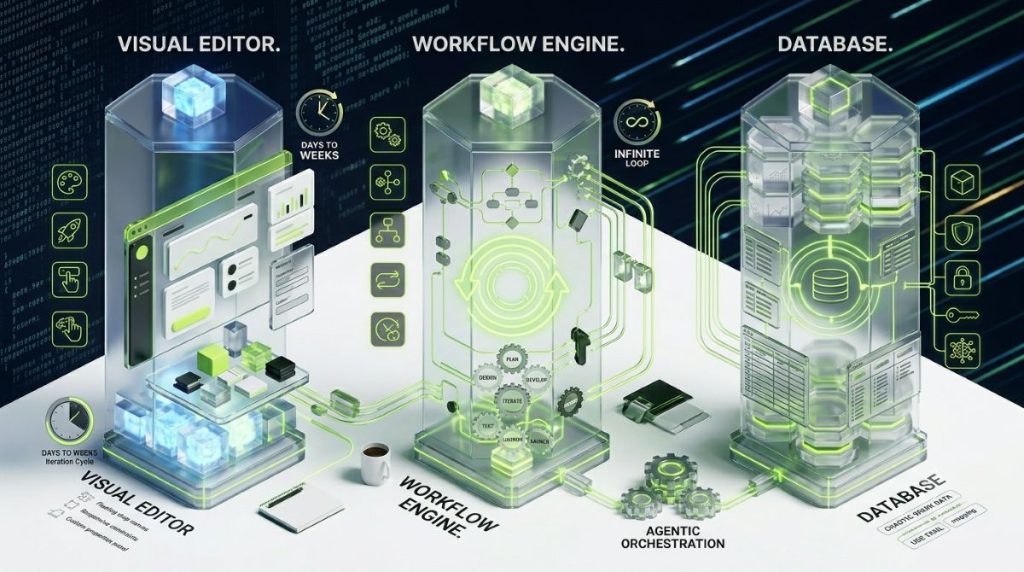
Every Bubble app is built on three components. Understand these and you understand the platform.
The Visual Design Editor
The editor is a drag-and-drop web design canvas. You place UI elements — buttons, input fields, repeating groups, image containers, text blocks — onto pages and position them using Bubble’s responsive layout system. Style properties (colours, typography, spacing, border-radius) apply without writing CSS. Bubble generates clean HTML and CSS for rendered pages, but the design process stays entirely visual.
Responsive web design is handled through a breakpoint system. Builders set how elements reflow, hide, or resize as the viewport narrows from desktop to tablet to mobile screen. Bubble’s layout containers work similarly to CSS Flexbox — you control direction, alignment, and gap spacing visually. For design-critical projects, custom CSS classes can be defined in app settings and applied to any element, giving front-end designers a familiar hook for overrides and animations.
The platform includes a design system layer: global fonts, colour tokens, and reusable style groups apply across the entire web application from a single settings panel. Changing a primary colour token updates every button and heading that references it. For teams building multi-page web applications, this is the difference between maintainable front-end design and the kind of inconsistency that accumulates across 40+ screens.
Figma design import exists and sounds convenient. In practice, imports often generate layout discrepancies that need manual fixes. Most experienced Bubble builders treat it as a starting reference, not a finished handoff.`
The Workflow Engine
This is where Bubble separates from every visual website builder on the market. Workflows are the programming logic layer of every Bubble application. They define what happens when a user takes an action — clicks a button, submits a form, triggers a scheduled event — and execute a chain of programmatic steps: check a conditional expression, query the database, call an external API, send an email, or redirect the user to a new page. Each workflow step is a unit of application logic.
What this replaces: backend programming. The workflow engine handles the same conditional logic, loop constructs, and server-side operations that a developer would write as functions in a backend language. It supports conditional branching (if/else logic), recursive workflows (a workflow that triggers itself on a schedule or condition), and backend scheduled events that run without any user interaction. Privacy rules and server-side actions in workflows enforce the same security model that a properly coded backend API would enforce. For a non-developer building anything with real application logic — multi-role access control, payment processing, data transformations — the workflow engine is Bubble’s defining competitive advantage.
The Built-in Database
Bubble includes a relational database system. You define data types (User, Product, Order, etc.), their fields, and the relationships between them. Privacy rules let you control who can read or write each field, and role-based access is fully configurable. Development and live environments are separate, with auto backups included.
The database is also Bubble’s most significant limitation. You can’t export it. If you ever want to leave Bubble, your data migrates but your application logic doesn’t. Vendor lock-in is real. Understand that clearly before committing months to a build.
Beyond these three pillars: Bubble includes user authentication out of the box, SEO tools for managing meta tags and sitemaps, Progressive Web App support, file management, and an API Connector for connecting to external services via REST. The plugin marketplace adds 6,000+ plugins for payments, analytics, UI components, and integrations. A curated look at the best Bubble plugins can help you shortlist the ones worth installing. Most popular plugins are free; premium ones typically run $5–$50 per month.
Extending Bubble with Custom Code and Scripts
Bubble is a visual development environment, not a closed sandbox. Where its built-in elements and workflows don’t reach, builders extend the platform with custom code.
HTML elements and custom JavaScript. Bubble’s design editor includes an HTML element that accepts raw HTML, CSS, and JavaScript. Builders use it to embed third-party widgets, implement tracking scripts, add custom animations, or build interactions that Bubble’s native components don’t support. Code placed in an HTML element runs client-side in the user’s browser, which means anything a frontend developer would write in a standard web project can run inside a Bubble app.
Custom CSS classes. Bubble’s built-in style system handles the majority of design needs. For edge cases — custom hover states, complex animations, pixel-specific overrides — builders define CSS classes in the app settings and apply them directly to elements. This keeps custom styling organised and reusable across the app without duplicating code.
The Plugin Editor and plugin ecosystem. Any Bubble user can build a plugin using the Plugin Editor, which accepts JavaScript for both client-side actions and server-side actions. Plugins extend Bubble’s workflow actions, data sources, and UI components. The community plugin marketplace (with close to 1,000 plugins as of 2026) is built entirely on this system — every plugin is someone’s JavaScript running inside Bubble’s environment.
API Connector scripting. The API Connector supports custom header injection, OAuth 2.0 flows, and JavaScript expressions for preprocessing API responses before Bubble stores them. For teams integrating with non-standard APIs or building custom authentication flows, this is where most of the scripting work happens.
The honest framing: Bubble is not a coding environment. Custom code in Bubble supplements visual development for edge cases. Most Bubble apps use little or no custom code. But the option exists, it’s documented, and it works — making the “no-code” label a starting point rather than a ceiling.
The 2026 Bubble AI App Generator: What It Actually Does
Bubble added an AI Copilot to the platform. Describe your app in a prompt and Bubble generates a working initial version (authentication system, data types, sample pages, basic workflows) in five to seven minutes.
That’s genuinely useful. For someone already familiar with Bubble, the AI scaffold cuts setup time significantly. For a first-time user, it produces a functional reference point to dissect and learn from.
Here’s where AI-first builders differ: tools like Base44 and Lovable offer ongoing conversational AI assistance. You describe what you want, they build it, you ask for changes, they iterate. It’s a back-and-forth development session. Bubble generates the first version. From there, you’re in the visual editor, building manually. The AI doesn’t continue assisting you.
This isn’t a criticism of the feature. For the user profile Bubble is designed for, it makes sense. Bubble’s power lies in manual, granular control. The AI Copilot is scaffolding, not a development partner. That’s an accurate match for what experienced Bubble builders actually want.
For beginners evaluating Bubble versus AI-first tools: try Bubble’s AI generator to see what it produces, then decide whether the manual editing environment feels worth learning. If the visual editor clicks for you, Bubble’s depth is unmatched. If it doesn’t, Lovable or Base44 will get you further faster on simpler projects.
Bubble.io Pricing in 2026: Plans, Workload Units, and What You’ll Actually Pay
Bubble’s pricing has changed substantially over the years and continues to evolve. All figures below reflect May 2026 annual billing rates. Always verify against the official pricing page before committing.
The Plan Tiers
Free: Access to the editor, AI Copilot, database, and workflow builder. Apps stay on a Bubble subdomain. No custom domain. No live deployment for real users. This is a learning and prototyping tier, not a product launcher.
Starter at $29/month (annual billing): Unlocks custom domains, live deployment, backend scheduled workflows, and 175,000 Workload Units per month. Minimum viable for a real product. Early-stage MVPs and small internal tools live here comfortably.
Growth at $119/month: 250,000 WUs, two app editors, premium version control, two-factor authentication, and 14-day server logs. The standard tier for SaaS products with actual paying users.
Team at $349/month: 500,000 WUs, multiple editors, team roles. Appropriate for scaling products with growing teams.
Enterprise: Custom pricing, dedicated infrastructure, SOC 2 compliance options, and negotiated WU limits.
Mobile pricing: Bubble introduced separate mobile pricing plans in October 2025. Mobile-only plans start at approximately $42/month. If you need both web and mobile access from a single subscription, combined plans start at $59/month and scale up to $549/month. Mobile is not included in the standard web-only plans above — verify current mobile pricing on Bubble’s pricing page before committing.
Understanding Workload Units
Every server-side operation your app runs consumes Workload Units: database reads, workflow steps, API calls, scheduled events. The plan’s monthly WU allocation is what you’re really buying. Exceed it and you pay overages.
The detail most pricing guides skip: poorly optimized apps burn WUs five to ten times faster than well-built ones. Using broad database filters on every list (:filtered by expressions running client-side) instead of specific queries is a common mistake that spikes costs dramatically. An app that should run fine on Starter can blow past it if the data architecture is sloppy.
For a concrete sense of real costs: production business apps with active users commonly land between $300–$1,500 per month in Bubble costs, depending on usage and optimization quality. Add plugin subscriptions, third-party API fees, and file storage for a complete budget picture.
Annual billing saves roughly 15–20% versus monthly. If you’re confident in the direction, it’s an easy optimization.
Is Bubble.io Free? The Free Plan and How to Cancel
Yes, Bubble is free to start. No credit card required to sign up. The free tier gives you full access to the editor, the AI Copilot, database creation, and workflow building across up to three test apps.
What the free plan can’t do: publish a live app to a custom domain, schedule backend workflows, or handle real user traffic reliably. The free tier is exactly what it says — a sandbox. Excellent for learning the platform and testing feasibility. Not a production environment.
When you’re ready to go live, Starter at $29/month is the minimum. That’s the plan that unlocks a custom domain, live deployment, and backend workflow capacity.
To cancel your Bubble subscription: navigate to your app’s Settings panel, click “App plan,” then select “Cancel Plan.” Bubble will ask you to select a reason and confirm. Alternatively, use the Bubble support chatbot (the conversation icon at the bottom right of any bubble.io page) and ask to cancel. The bot handles the process automatically.
Canceling downgrades your app to the Free tier. Custom domains are disconnected immediately, but your app’s data and structure remain intact. You don’t lose your work. You lose the ability to send real users to it.
If you cancel and later want to resubscribe, note that failed payment history can sometimes require removing and re-adding your payment method to reset the billing record.
What Can You Actually Build on Bubble.io?
Bubble’s sweet spot is complex web applications. The platform handles these categories well.
SaaS platforms and mobile SaaS apps: Subscription web applications with user accounts, billing (via Stripe integration), dashboards, and role-based access — including native mobile app versions for iOS and Android where the same database serves both platforms. Bubble’s workflow engine and database privacy rules are built for exactly this.
Marketplaces: Two-sided web and mobile marketplace applications with buyer and seller logic, listings, reviews, and payment processing. Flexiple, a tech talent marketplace, processed over $6 million in payments by 2026 on a Bubble-built platform.
Internal tools and mobile field apps: Web-based CRM replacements, data management systems, Kanban task trackers, approval workflows — and increasingly, native mobile companion apps for field teams who need the same data on iOS and Android devices. These are Bubble’s most underrated use case.
Client portals and B2B admin panels: Multi-role interfaces where different user types see different data and take different actions.
Membership sites: With complex permission structures, gated content, and subscription logic.
Business productivity and operational software. This is Bubble’s most underrated category. Operations teams use it to build workflow approval systems, sales pipeline trackers, field service apps, team dashboards, and HR automation tools — replacing point solutions that each charge per seat. For a growing business that has outgrown spreadsheets but doesn’t need enterprise software, a custom Bubble app is often a more capable and cheaper alternative than purchasing a dedicated productivity platform.
Where Bubble struggles: consumer-facing mobile apps that need native performance, machine learning development, applications requiring code export or self-hosted infrastructure, and high-traffic consumer products where performance tuning becomes a significant ongoing cost.
The native mobile app builder entered public beta in mid-2025, with dedicated mobile pricing plans live since October 2025. It’s meaningful progress. For now, if a native mobile experience is your core product, the builder is still maturing. Feature gaps (deep links, full third-party plugin support) mean it’s a platform to watch closely, not yet one to bet a mobile-first launch on.
Mobile with Bubble.io: Three Paths to Your Users’ Phones
Since June 2025, Bubble has been a mobile app development platform as well as a web platform. More than 180,000 mobile apps have been built on Bubble since the native builder launched — and dedicated mobile pricing plans went live in October 2025. For anyone evaluating Bubble today, mobile capability is part of the core product, not an add-on.
Three approaches exist in 2026, each with different tradeoffs:
Path 1: The Native Mobile Builder
Bubble’s flagship mobile option uses React Native under the hood, but keeps the entire development process inside Bubble’s visual editor. You build mobile screens, design navigation, and configure workflows exactly as you would for a web app — then submit native iOS and Android builds to the App Store and Google Play without leaving the platform.
Native features available from inside the builder: camera access, GPS and location services, push notifications, in-app purchases, and native swipe/gesture navigation. Your web and mobile apps share the same database and backend workflows, so you’re not rebuilding logic from scratch — only the interface layer changes.
The limitation every guide buries: if you already have a Bubble web app, there is no automatic conversion. Every mobile screen must be built from scratch in the mobile editor. The backend transfers; the frontend does not. Plan for this before committing to the native path.
Bubble also added AI generation for native mobile apps in 2025 — the same AI scaffold that works for web apps applies to mobile, generating a starting structure from a text prompt.
Path 2: Web Wrappers
Before the native builder, wrapping a Bubble web app inside a native container (using tools like Natively, MobiLoud, or BDK) was the standard approach for App Store publishing. Wrappers package your existing responsive web app in a WebView shell and handle App Store compliance. They’re faster to deploy but don’t give access to native device features. For teams with a working Bubble web app that simply needs an app store presence, a wrapper can be the right call.
Path 3: Responsive Web Only
Any Bubble web app can be designed to be fully responsive for mobile browsers. No App Store presence, no push notifications, no native device access. For internal tools, admin panels, and B2B products where the audience is on desktop or is acceptable to use via mobile browser, this is often sufficient — and costs nothing additional.
Which path fits your project: If you need a consumer-facing app with App Store discovery, notifications, and device access, the native builder is the right choice. If you have an existing Bubble web app and need a store listing quickly, consider a wrapper. If mobile is secondary to a web-first product, responsive design handles it without additional tooling.
Bubble.io vs AI App Builders: The 2026 Honest Verdict
This is the question most articles avoid answering clearly. They’re written by Bubble agencies who want you to hire them.
In 2026, AI-first builders like Lovable and Base44 generate functional apps from a plain-English prompt in under two minutes. They offer conversational AI assistance throughout development — describe what you want, the AI builds and iterates. For straightforward apps, this speed is real.
Independent testing by Manus.im in June 2026 found that Bubble’s editor, even with its AI Agent, remained the most complex of the platforms tested. “Power comes with overhead.” That’s accurate.
Choose Bubble when:
- Your app has complex multi-role logic: admin, vendor, and customer roles each with different data access and workflow paths
- You need fine-grained control over data privacy rules and user permissions
- You’re building for sustained production use, not a prototype you’ll validate and discard
- The product is web-first, with mobile as secondary
- You’re willing to invest 20–50 hours learning the platform before building something polished
Choose an AI-first builder (Lovable, Base44) when:
- You need a working prototype or MVP within days
- The app is primarily CRUD-based with one or two user roles
- You want ongoing AI guidance during development rather than a one-time scaffold
- Speed-to-validation matters more than long-term architectural control (in which case a dedicated MVP no-code platform may serve you better)
An increasingly common pattern in 2026: founders use Lovable or Base44 to validate the concept in a week, then rebuild on Bubble for the production version. That’s a sensible allocation of effort. The two tool types serve different stages of a product lifecycle. Treating them as direct competitors misses the point.
Bubble remains, as nocode.mba put it in 2026, “the gold standard for complex web applications when you need power and flexibility without compromise.” That’s a narrower crown than it used to be. It’s still a genuine one.
Getting Started with Bubble.io
Getting started on Bubble follows a clear progression:
Step 1 — Sign up. Go to bubble.io and create a free account. No credit card required. The onboarding flow includes a built-in interactive tutorial covering the core editor concepts.
Step 2 — Use the AI generator or start from scratch. On the new app screen, describe your app in a prompt to have Bubble’s AI scaffold a starting version (authentication, data types, basic pages, workflows) in under a minute. Alternatively, open a blank canvas and build from the first element. The AI-generated version is a reference point, not a finished product — plan to edit it significantly.
Step 3 — Work through the official resources. The Bubble Manual (official documentation) covers every feature. Bubble Academy (free structured courses) is the most reliable path from orientation to capable builder. The community forum is active and genuinely helpful for stuck moments.
Step 4 — Build something small first. The most common beginner mistake is trying to build the full product before understanding the platform. Build a simple two-page app with user authentication and a database before tackling the real product. Two to four hours here saves twenty hours of rebuilding later.
Expect a real learning curve. Bubble is more complex than any template-based builder. If you’re wondering exactly how long it takes to learn Bubble and which courses are worth the time, we’ve covered that in depth. The workflow engine and data model require genuine investment to understand. Builders who pick it up fast tend to have a structured approach or prior experience with relational databases. Those who struggle most try to figure it out by clicking around.
For anyone building a complex SaaS or marketplace, working with an experienced Bubble developer for at least the initial architecture is worth the cost, particularly for data model design, which is difficult to restructure once you’re in production.
The Bubble community forum is active and genuinely helpful. For beginners looking for a structured foundation, our Bubble.io beginner tutorial is a solid starting point.
The Platform’s Position in 2026
Bubble is not the default no-code answer anymore. The rise of AI-first builders has changed what’s possible for simpler projects, and the WU pricing model means costs at scale require active management. Those are real changes.
What hasn’t changed: no other no-code platform matches Bubble’s depth for production web application and mobile app development combined. Visual web application development, backend programming logic, relational database management, and — since 2025 — native iOS and Android mobile app publishing, all inside a single development environment. The plugin ecosystem and community depth to handle most business requirements remains unique in the no-code mobile app builder market.
For a non-developer who needs a functioning, scalable web application or native mobile app: the learning investment is real, the pricing requires planning, and vendor lock-in deserves clear eyes. Accepting all three, Bubble delivers a level of web and mobile app development control that no other no-code platform provides at this price point.
As Bubble’s AI features mature and the native mobile app builder stabilizes over the next 12 months, both web app and mobile app development on the platform will become easier to access. The question today isn’t whether Bubble is capable of building production web and mobile applications. It clearly is.
Frequently Asked Questions
Yes. Bubble’s free plan gives you full access to the visual editor, AI Copilot, database, and workflow tools across up to three apps. The limitation: free apps can’t be published to a custom domain or deployed for real users. They run on a Bubble subdomain and are unsuitable for production traffic. To go live with a real product, the minimum is the Starter plan at $29/month on annual billing.
Yes. Bubble is now a web and mobile app development platform. The native mobile app builder entered public beta in June 2025, with dedicated mobile pricing plans live since October 2025. More than 180,000 mobile apps have been built on Bubble since launch. The builder targets iOS and Android publishing via the App Store and Google Play, using React Native under the hood — all from within Bubble’s visual editor, without switching to a separate mobile development environment.
The honest caveat: the mobile app builder is still maturing. Deep links and full third-party plugin support on mobile are in progress. Web apps cannot be automatically converted to mobile apps — every iOS and Android screen must be rebuilt in the mobile editor from scratch. If a native mobile app is the core product rather than a web-app companion, evaluate the current state carefully before committing. For founders who need both a web application and a mobile app from one platform, Bubble’s shared database and backend make it the most practical single-environment option available without writing code.
Expect 20–40 hours before you can build something functional. Most builders reach genuine proficiency after two to three months of consistent use. The workflow engine and relational data model are where most of that time goes. Bubble’s documentation and Academy materials are high quality. If you’re planning a complex production build, hiring a Bubble developer for the initial architecture design often saves more time than it costs.
Bubble does not support code export. There is no migration path off the platform. Your app’s logic, workflows, and database schema exist only in Bubble’s environment. Data can be exported, but the application cannot be moved to another host or rebuilt from exported code. Bubble offers an open-source release guarantee for emergencies, but in practical terms, choosing Bubble is a long-term platform commitment. Know that going in.
Go to your app’s Settings panel, navigate to “App plan,” and click “Cancel Plan.” Select a reason and confirm. Alternatively, open the Bubble support chatbot (the conversation icon at the bottom right of any bubble.io page) and ask to cancel. Canceling downgrades your app to the Free tier — your custom domain will be disconnected, but your app data and structure are preserved. You can resubscribe at any time.
Enable the mobile canvas from within your Bubble project — web and mobile live under the same project, sharing the same database and backend workflows. Open the mobile editor and build your screens using Bubble’s mobile-specific elements (mobile navigation, native components, gesture support). Test on a real device using the Bubble Go app before submitting. For App Store submission, you’ll need an Apple Developer account ($99/year) and a Google Play account ($25 one-time). If you already have a Bubble web app, note that screens cannot be automatically converted — every mobile screen must be rebuilt in the mobile editor from scratch.
Both, as of 2025. Bubble launched as a web application development platform and remains the strongest no-code option for complex web apps. In June 2025, it added a native mobile app builder that outputs iOS and Android applications to the App Store and Google Play. The two builders share the same project: your web app and mobile app run on the same database, backend workflows, and privacy rules. You design the web interface in the web editor and the mobile interface in the mobile editor, separately — but the logic layer is shared. For builders who want to ship both a web application and a native mobile app from a single no-code development platform, Bubble is the most complete option available without learning traditional mobile programming.