
PHP, the acronym for Hypertext Preprocessor, is a widely used open-source scripting language, particularly popular for web development. In recent years, it has gained significant traction among no-coders – individuals who create applications and websites without traditional programming skills. Let’s delve into what it is and why it’s relevant for those venturing into web development without coding expertise.
What is PHP? (The Engine Under the Hood)
What Does It Stand For?
PHP stands for Hypertext Preprocessor, which is a recursive acronym. Initially, it was known as “Personal Home Page,” but over time, its functionality expanded to processing data before delivering it to the user’s browser. Today, PHP powers more than 75% of websites globally, including major platforms like WordPress and Shopify.
How PHP Works (The Request-Response Cycle)?
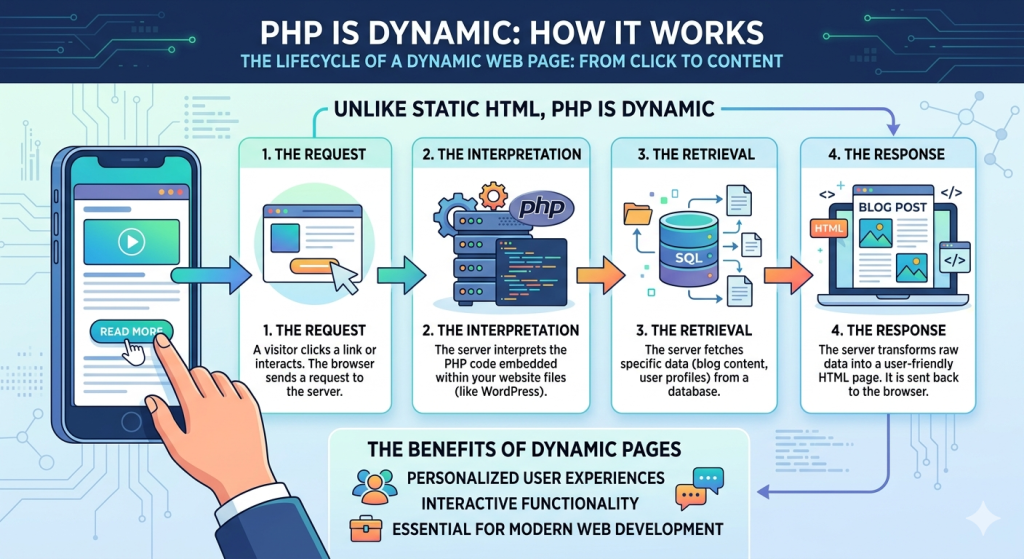
Unlike static HTML, PHP is dynamic. It dynamically constructs your website each time a visitor interacts with it, such as by clicking. The process involves several steps:
- The Request: When a user clicks a link, the browser sends a request to the server.
- The Interpretation: The server interprets the PHP code embedded within your website files, such as those in WordPress.
- The Retrieval: The server fetches specific data, such as blog post content or user profiles, from a database.
- The Response: The server transforms this raw data into a user-friendly HTML page, which is then sent back to the user’s browser for display.
This dynamic nature of PHP enables websites to deliver personalized, interactive user experiences, making it an essential tool for modern web development.
Why PHP Matters to No-Code Users?
Troubleshooting WordPress “Glitches”: When dealing with troubleshooting WordPress “glitches,” understanding PHP becomes crucial for no-code users.

Most errors, such as the infamous “White Screen of Death”, are often caused by PHP syntax issues or memory depletion. It’s important to realize that a “500 Internal Server Error” isn’t some mystical occurrence; it usually indicates a script timing out or a clash between two plugins vying for the same “hook.”
Breaking the “No-Code Ceiling”: As no-coders progress, they often encounter limitations with plugins that are almost perfect but require minor adjustments. This is where a basic grasp of PHP can be a game-changer. By incorporating Low-Code snippets, users can tailor their experience by customizing elements such as the WooCommerce checkout flow, integrating custom data fields into the WordPress dashboard, and linking their websites to cutting-edge AI APIs, without waiting for plugin updates.
In essence, delving into PHP empowers no-coders to break through the “No-Code Ceiling” and elevate their websites with personalized touches that were once out of reach.
Comparison Table: The Web Development Trinity
| Feature | HTML (The Skeleton) | JavaScript (The Muscle) | PHP (The Brain) |
| 1. Primary Job | Structure & Layout | Interactivity & Animation | Logic & Data Processing |
| 2. Execution | Browser (Client-side) | Browser (Client-side) | Server (Host-side) |
| 3. Safety | Public (Anyone can see it) | Public (Viewable in console) | Private (Code stays on server) |
| 4. Database Access | None | Limited (via APIs) | Native & Powerful |
| 5. 2026 Status | Essential Standard | Highly Dynamic | The Engine of WordPress 7.0+ |
The “Smart Admin” Safety Checklist:
While PHP may seem complex to non-coders, understanding its importance and following a safety checklist can significantly improve your website’s performance and security.
When working with PHP, safety should always be a top priority. The “Smart Admin” Safety Checklist provides crucial steps to ensure your site remains both fast and secure.
1. Check the Version: First and foremost, always check the version you are using. As of 2026, it is essential to ensure that your host is running PHP 8.4 or 8.5. Older versions like 7.4 not only pose security risks but are also significantly slower, impacting your site’s performance.
2. The Staging Rule: Never edit a PHP file directly on a live site. Utilize a staging environment to catch any errors before they affect your customers’ experience.
3. Use a Snippet Manager: Instead of directly editing the functions.php file, consider using a snippet manager like “Code Snippets”. Such plugins allow you to toggle your custom PHP on and off with ease, providing a convenient and safe way to manage your code.
4. The Semicolon Law: Adhering to the semicolon law is crucial in development. PHP syntax is sensitive, and even a single missing semicolon can potentially crash your site. Always double-check your code using tools like an AI-assisted editor or a linter to ensure error-free execution.
By following these practical and logical steps outlined in the “Smart Admin” PHP Safety Checklist, you can optimize your site’s performance and enhance its security, even without an in-depth coding background.
Conclusion: Your Path to Mastering the Stack:
The Verdict: To truly master the stack and run a high-performance site, you don’t necessarily have to be a software engineer. Instead, you must overcome any fear of delving into the code.
The Recommendation: One way to kick-start this journey is to check your WordPress “Site Health” tool to identify the PHP version in use. Understanding how PHP interacts with your database is key to transitioning from a technology user to its architect.
PHP, a widely used scripting language, serves as the backbone for dynamic websites and applications. Despite its technical nature, grasping the basics doesn’t require a coding background. No-coders can benefit from it by gaining insights into how it communicates with databases and handles server-side operations.
The Result: By familiarizing yourself with your site’s version, you gain a valuable starting point on your path to mastering the stack. The “Site Health” tool provides an overview of your site’s performance, highlighting areas that may require attention. This information empowers you to make informed decisions and optimize your site’s efficiency.
Embracing PHP as a no-coder unlocks a new level of understanding. You transition from merely using tools to strategically architecting solutions. Learning how PHP functions within your site’s framework equips you to make informed decisions and optimize performance.
In conclusion, while you may not need to be a software engineer, developing a comfort level with code is crucial for managing a high-performance site. By exploring your site’s version and understanding its role in database operations, you pave the way to becoming a proficient technology architect, capable of driving optimal site performance.
Frequently Asked Questions (FAQs)
Far from it. While new languages appear every year, the vast ecosystem of WordPress (powering 43%+ of the web) ensures that it remains the most practical language for business owners to understand.
Poorly written code will, but modern PHP (8.5+) is incredibly fast. In fact, one custom PHP function is often much “lighter” and faster than installing a bulky plugin to do the same task.
Yes, but you must be a “Smart Admin.” Tools like ChatGPT or Claude are great at generating PHP snippets, but you need to understand the “Request-Response” logic to know where to put that code so it actually works.