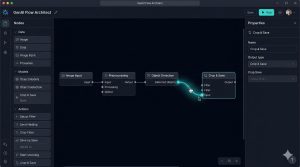

TL;DR — Quick Summary
- A no-code AI platform lets you build, train, and deploy AI agents through a visual interface — zero coding required
- It differs from traditional automation tools (like Zapier) by incorporating AI reasoning, not just trigger-action logic
- The 7 platforms below are ranked by use case: customer support, internal ops, sales, content, e-commerce, HR, and budget
- Each platform is paired with a specific business role and real-world deployment scenario
- A step-by-step build guide + ROI framework is included at the end
What Is a No-Code AI Platform? (Plain-English Answer)
A no-code AI platform is a software environment that allows anyone — regardless of technical background — to build, configure, and deploy AI-powered applications or agents using a drag-and-drop visual interface, pre-built logic blocks, and model connectors. No syntax. No API documentation. No developer required.
These platforms sit on top of large language models (like GPT-4, Claude, or Mistral) and give you the control layer: the ability to define what the AI knows, how it responds, what actions it can take, and where it lives (your website, Slack, CRM, or custom interface).
How it differs from traditional automation tools: Zapier and Make are powerful — but they run on rigid trigger-action rules. They move data from Point A to Point B. A no-code AI platform adds reasoning: the agent can interpret, respond, decide, and adapt based on context. That’s the fundamental shift.
The three layers every no-code AI platform runs on:
- Model layer — the underlying AI (GPT-4o, Claude 3, Gemini, Mistral, or a fine-tuned variant)
- Logic layer — the visual workflow builder where you define the agent’s behavior, decision tree, and memory
- Interface layer — the deployment channel: web widget, Slack bot, API endpoint, email responder, or CRM integration
Who actually uses these: Operations managers who want to automate internal requests. E-commerce store owners building product recommendation bots. Customer support teams replacing tier-1 ticket routing. Content teams building AI research assistants. The entry barrier is low — the application ceiling is surprisingly high.
One data point that puts this in perspective: 65% of incoming support queries were resolved without human intervention in 2025, up from 52% in 2023 — primarily driven by no-code AI agent deployments in customer service (BigSur via NextPhone, 2026). For operations teams, partnering with an AI Automation Agency helps businesses implement intelligent automation that now handles customer interactions at just $0.50–$0.70 per conversation, compared to $6–$8 for a human agent – a 12× cost differential that demonstrates the ROI of AI automation before you even open a platform (Gartner / theStacc, 2026).
What Is a No-Code AI App Builder? (And How It Differs From a Platform)
The terms get used interchangeably, but they describe slightly different things.
A no-code AI platform focuses on AI agent logic — defining behaviors, training models on your data, and deploying agents to existing channels.
A no-code AI app builder focuses on building the full user-facing product — the interface, the data model, the navigation, and the AI layer all bundled into a deployable web or mobile application, making it easier to hire AI engineers and accelerate development.
Think of it this way: if you want an AI that answers customer questions on your website, you need a platform. If you want to build an entirely new SaaS product that includes an AI feature, you likely need an app builder.
| Use Case | Tool Type | Example |
|---|---|---|
| Build an AI chatbot for your website | Platform | Voiceflow, Tidio |
| Build a custom SaaS product with AI features | App Builder | Bubble + OpenAI plugin, Glide |
| Automate internal team workflows with AI | Platform | Stack AI, Relevance AI |
| Create an AI-powered client portal | App Builder | Softr, AppGyver |
For most business owners reading this, a no-code AI platform is the right starting point. App builders are a heavier lift — closer to product development than workflow automation. You can explore more options in our no-code app builders guide on SmartPHP.net.
How We Ranked These 7 Platforms
Before listing tools, it’s worth being transparent about what earned a spot on this list — and what didn’t.
Evaluation criteria:
- Ease of use for non-technical users — can a non-developer build a working agent within 2 hours?
- AI agent capabilities — does it support multi-step reasoning, memory, and tool use (not just FAQ bots)?
- Integration depth — how well does it connect to CRMs, databases, email, Slack, and custom APIs?
- Pricing transparency — is there a usable free tier, and does the paid plan scale reasonably?
- Deployment flexibility — can it go live on a website, CRM, Slack, or custom channel?
What we ruled out: Platforms still in early beta with limited integrations, tools that are essentially rebranded form builders with a thin AI layer, and any AI agent development services platform that requires a developer to complete the setup.
Each platform below is tagged with its best-fit use case, not a generic “great for everyone” claim.
Platform #1 — Voiceflow — Best for Customer-Facing Business Agents
Voiceflow is built specifically for designing and deploying conversational AI agents. Its canvas-based builder lets you map conversation flows visually — branching logic, fallback responses, escalation paths, and all.
Standout features: Multi-turn conversation memory, intent recognition, knowledge base upload (PDFs, URLs, Notion docs), and API actions that let the agent trigger real backend events (not just respond with text).
Pricing: Free tier available with limited steps and projects. Pro plans start from ~$40/month. Team and enterprise tiers offer advanced collaboration and analytics.
Real-world use case: A boutique travel agency used Voiceflow to build a trip-planning agent embedded in their website. The agent qualifies visitor intent, collects preferences, and hands off to a human consultant only when the client is ready to book — reducing initial consultation calls by roughly 40%.
🎙️ From the Founder’s Mouth — LowCode Podcast, Season 2, Episode 5
Braden Ream, CEO and founder of Voiceflow, explained on the LowCode Podcast exactly why the platform’s scope expanded so far beyond its original voice-only roots:
“Voiceflow is an easy way to build conversational assistants — both chat and voice, used by over 100,000 teams now. Think web chat, WhatsApp assistants, messenger assistants, call centers — really any sort of automated conversation for any use case.”
On why enterprises started pulling Voiceflow into their workflows unexpectedly: “A really big, well-known telecom company was using Voiceflow and we said, what Alexa Skill are they building? They told us they were using it to prototype call centers — because there’s no good prototyping solution. You either have to ship with real code, which is expensive, or you don’t get to user-test and end up shipping really bad experiences. That was a light bulb moment for us.”
On the critical difference between AI in the creation phase versus at runtime: “For customer support, large language models are problematic at runtime because their tendency to make stuff up is really dangerous in the enterprise. You spend 100 years building a brand, and it only takes a couple of interactions with a bot that makes stuff up to tear it down.”
— Braden Ream, CEO & Founder, Voiceflow | LowCode Podcast S2 Ep5 Full episode:
Platform #2 — Stack AI — Best for Internal Operations & Workflow Agents
Stack AI is purpose-built for enterprise and ops-heavy teams that need AI agents connected to their internal data — databases, document stores, CRMs, and custom APIs. It uses a node-based visual builder where you literally draw how data flows through the AI logic.
Builder interface: Think of it like a flowchart where each node is an AI action — retrieve data, process it, run a conditional, call an API, return a response. Non-developers can follow the logic intuitively after a short learning curve.
Integrations: Airtable, Notion, PostgreSQL, Salesforce, Slack, HubSpot, Google Drive, and REST APIs. This is where Stack AI genuinely outperforms simpler chatbot tools.
Limitation: The interface is more complex than consumer-grade tools. It’s not the fastest platform to learn — but for internal business agents dealing with structured data, it’s one of the most capable no-code options available.
Platform #3 — Relevance AI — Best for Sales & Lead Qualification Agents
Relevance AI targets revenue teams specifically. Its agent builder is designed around multi-turn sales conversations: qualifying prospects, collecting context, and routing leads based on custom scoring logic.
Multi-turn memory: The agent remembers previous conversation turns and adapts responses based on accumulated context — essential for lead qualification that doesn’t feel like a scripted survey.
CRM sync: Integrates with HubSpot and Salesforce to push qualified lead data directly into pipelines. No manual export, no copy-paste.
Pricing vs. capability: The free tier is generous for solo users. Paid plans unlock higher usage limits, team collaboration, and custom model connections. The upgrade is worth it once you’re processing more than 100 leads per month through the agent.
🎙️ Founder Perspective — SmartCompany / Bessemer Ventures Interview
Daniel Vassilev, Co-CEO of Relevance AI, explained what distinguishes his platform’s approach in a 2025 interview after the company’s $37M Series B raise:
“A lot of people building in this space are focused on engineering and frameworks. We’ve departed from that because automation doesn’t usually fail because of technical limitations. It typically fails because of what we call a lack of organisational wisdom.”
On the scale signal: Relevance AI reports that 40,000 agents were created on its platform in January 2025 alone — a 40× year-on-year increase — with clients ranging from high-growth scaleups to Fortune 500 companies including Activision and SafetyCulture.
— Daniel Vassilev, Co-CEO, Relevance AI | SmartCompany, May 2025 Source: smartcompany.com.au/startupsmart/relevance-ai-agent-37-million-series-b-raise/
For teams evaluating CRM-connected tools alongside this, our best no-code CRM builders guide covers complementary platforms worth pairing.
Platforms #4 Through #7 — Rapid Comparison Breakdown
Platform #4 — Bardeen AI — Best for Content & Knowledge Base Agents Bardeen bridges AI automation — it’s particularly strong at scraping, organizing, and surfacing knowledge for research-heavy workflows. Teams use it to build agents that pull from multiple knowledge sources and summarize on-demand. Strong browser integration makes it useful for content operations teams. For visual content needs, teams can also use AI poster creation to produce professional poster designs more efficiently without starting every design from scratch.
Platform #5 — Tidio — Best for E-Commerce & Product Recommendation Agents Tidio is built for WooCommerce and Shopify stores. Its AI agent (Lyro) handles product questions, order tracking, return inquiries, and basic upsells — all without leaving the chat window. The e-commerce context training is what separates it from generic chatbot builders.
Platform #6 — Leena AI — Best for Team-Internal Assistants (HR, Onboarding, IT Helpdesk) Leena AI specializes in employee-facing agents: HR policy Q&A, IT ticket resolution, onboarding task guides, and leave management. It integrates with HRMS platforms and internal wikis. For mid-size teams, it eliminates a significant portion of repetitive internal requests.
Platform #7 — Flowise — Best Budget Option for Solopreneurs and Micro-Businesses Flowise is open-source, self-hostable, and free. It uses a drag-and-drop canvas to build LLM-powered workflows — RAG pipelines, chatbots, data agents, and more. It requires slightly more setup than cloud-hosted alternatives, but for technical-leaning solopreneurs or micro-businesses that want full control and zero subscription costs, it’s unmatched. Start here, then graduate to a hosted platform as you scale.
The No-Code AI Agent Stack — What Tools Work Best Together
No platform operates in isolation. The most effective setups pair a no-code AI platform with a lightweight integration layer and a structured knowledge base.
Layer 1 — Agent platform: Voiceflow, Relevance AI, or Stack AI (based on use case) Layer 2 — Integration layer: Make or n8n for connecting your agent to external apps without custom API code Layer 3 — Knowledge base: Notion AI, Confluence, or a custom RAG pipeline built with Flowise for giving your agent accurate, up-to-date context
The integration layer is where most setups break. Connecting your agent to a CRM, email system, or an on-demand service such as a Turo clone requires mapping data correctly — and most no-code AI platforms handle this through native connectors, not raw APIs. If your chosen platform lacks a native connector for your stack, Make or n8n fills that gap reliably.
SmartPHP.net’s best low-code integration platforms guide covers Make, n8n, and five alternatives with a comparison of their connector ecosystems — worth reviewing before finalizing your stack.
Step-by-Step — Build Your First Business AI Agent in Under 60 Minutes
Step 1 — Define the agent’s exact job One problem. One flow. Don’t build a generalist agent out of the gate. Pick a single repetitive task (e.g., “answer tier-1 support questions about our pricing and refund policy”) and design for that only.
Step 2 — Choose your platform based on deployment channel Where does the agent live? Website widget → Voiceflow or Tidio. Slack → Stack AI or Relevance AI. CRM pipeline → Relevance AI. Internal HR portal → Leena AI. Budget/self-hosted → Flowise.
Step 3 — Connect your knowledge source Upload your FAQs, product documentation, or policy PDFs. Most platforms support document ingestion directly. For dynamic data (live inventory, CRM records), connect via native integration or Make.
Step 4 — Test with edge cases before going live Run at least 20 test conversations. Focus on ambiguous inputs, multi-step questions, and requests outside the agent’s scope. Define a clear escalation path for anything the agent can’t confidently handle.
Step 5 — Monitor, iterate, and expand Most platforms offer conversation analytics. Review weekly. Look for high-frequency unanswered questions — those become your next knowledge base additions or your next agent capability.
5 Mistakes Teams Make When Deploying No-Code AI Agents
1. Building a multi-purpose agent from day one A single agent trying to handle sales, support, onboarding, and HR questions performs none of them well. Narrow scope first. Expand scope after you’ve validated the agent’s core behavior.
2. Skipping the context layer An agent running on prompts alone — no document uploads, no connected data, no structured knowledge — will hallucinate and frustrate users within days. Context is what makes an agent trustworthy, not the underlying model.
The data backs this up: Gartner projects that over 40% of agentic AI projects are at risk of cancellation by 2027 — and governance gaps, unclear ROI, and insufficient context layers are the three most cited reasons (Gartner, via paul-okhrem.com, 2026). The teams that succeed deploy narrow, well-governed agents with clear knowledge bases — not broad autonomous systems launched with a general-purpose prompt.
3. No escalation logic Every agent needs a defined “I don’t know” path. What happens when the agent can’t answer confidently? Graceful handoff to a human or a ticket system is non-negotiable for production deployments.
4. Treating the agent as set-and-forget Agents degrade over time as your product, policies, or pricing changes. Schedule monthly knowledge base reviews the same way you’d schedule a content audit.
5. Choosing based on hype, not integration depth The flashiest platform demo won’t matter if the tool doesn’t natively connect to your CRM or help desk. Integration depth is the most underrated selection criterion.
The Hidden ROI Framework Most No-Code AI Guides Never Show You
Every platform comparison article tells you which tool to pick. Almost none of them tell you how to measure whether it’s working.
Calculate your time-to-automation ROI before you commit to a platform:
- Identify the task you’re automating and how many hours per week it currently consumes
- Estimate agent setup time (realistically: 4–10 hours for a well-scoped first agent)
- Calculate: (weekly hours saved × hourly cost × 52 weeks) − (annual platform cost + setup time cost)
- If payback period is under 90 days, the platform justifies the investment
What real-world deployments show: McKinsey’s Global AI Survey 2025 found organisations that deploy AI automation well achieve a 5.8× average ROI within 14 months of production deployment. Across customer service specifically, businesses report average returns of $3.50 for every $1 invested, with leading deployments hitting 8× ROI (IDC / Microsoft, 2026). For SMBs using no-code platforms, annual savings from AI-driven workflow automation typically range from $12,000 to $48,000 per year — achieved primarily through after-hours ticket deflection and high-volume query handling (theStacc client benchmarks, 2026).
These numbers compound. Research from Gartner and McKinsey consistently shows AI automation ROI grows 41% in year one, 87% in year two, and exceeds 124% by year three as knowledge bases mature and resolution rates climb.
The 3-metric agent health dashboard: Track these three numbers weekly after launch:
- Resolution rate — % of conversations the agent fully resolves without human escalation (target: 60–80% at 30 days)
- Handoff rate — % that escalate to a human (healthy if it’s dropping month-over-month)
- Task accuracy — % of responses rated correct or helpful (gather via thumbs up/down or CSAT in the chat widget)
30 / 60 / 90-day benchmarks: At 30 days: resolution rate should be stable. At 60 days: you should see measurable handoff rate reduction. At 90 days: the agent should be handling a volume of queries that would have required at least 5–10 hours of manual work per week.
When to upgrade your platform vs. rebuild your agent logic: If resolution rate is low but the platform has no analytics to diagnose why — upgrade the platform. If resolution rate is low and you can see the gaps clearly in conversation logs — rebuild the agent’s knowledge base before spending on a platform upgrade.
Key Takeaways
- A no-code AI platform is not a chatbot builder — it’s a full agent configuration environment built on top of a language model
- Platform choice should be driven by deployment channel and integration requirements, not UI aesthetics
- The biggest ROI gains come from narrow, well-scoped agents — not generalist ones
- Resolution rate, handoff rate, and task accuracy are your three post-launch metrics
- Every platform on this list has a free tier or open-source path — there’s no reason to commit budget before testing
Final recommendation: Start with Voiceflow (customer-facing) or Stack AI (internal ops) depending on your primary use case. Run a 30-day pilot. Measure against the three-metric health dashboard above. Upgrade or expand only after validation.
If you’re running a WordPress site and want to understand how these tools integrate with your existing setup without touching code, SmartPHP.net’s no-code resource library covers implementation guides built specifically for admins and non-technical site owners.
FAQs
A no-code AI platform is a visual environment where you configure, train, and deploy AI agents without writing code. You connect an AI model to your data, define how the agent should respond, and deploy it to your website, CRM, or Slack — all through a drag-and-drop interface designed for non-developers.
A no-code AI platform focuses on building agent behavior and deploying it to existing channels. A no-code AI app builder (like Bubble or Glide) lets you build an entire product — UI, database, and AI features — from scratch. For most business owners automating workflows, a platform is the right starting point.
Yes, with the right platform. Tools like Voiceflow, Relevance AI, and Tidio are designed specifically for non-technical users. You’ll need to define the agent’s purpose clearly and prepare your knowledge base content — but no syntax or API experience is required to ship a working agent.
Voiceflow and Tidio both offer WordPress embed options. For deeper workflow integration (connecting to WooCommerce data or custom post types), pairing a no-code AI platform with Make or n8n gives you the most flexibility without requiring custom plugin development.
For the majority of SMB use cases — customer support, lead qualification, internal Q&A, and onboarding — yes. Where custom-built agents still have an edge is in highly specialized domains, proprietary model fine-tuning, and applications that require real-time data processing at scale. Most businesses don’t need that level.
Free tiers are available on Voiceflow, Relevance AI, Tidio, and Flowise (open-source). Paid plans for production deployments typically range from $40–$200/month depending on usage volume and team size.
Choosing based on the UI demo rather than integration depth. A visually impressive builder that doesn’t connect natively to your CRM or helpdesk will require workarounds that add complexity and cost over time. Always validate integrations before committing to a platform.
The AI agents market hit $10.9 billion in 2026 and is projected to reach $50 billion by 2030 at a 45.8% CAGR (Grand View Research). Gartner found that 51% of enterprises already run AI agents in production as of 2026 — not pilots, but live systems. For SMBs, this matters because the platforms capturing that growth are investing heavily in features and integrations right now. The no-code AI platform you choose in 2026 will be substantially more capable in 12 months than when you sign up. Start narrow, start soon, and pick a platform with a strong integration roadmap rather than waiting for “the perfect tool.”