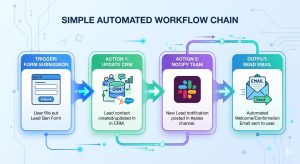

Here’s the bottleneck most business owners find too late: it isn’t talent or budget. It’s the repeated last-mile tasks your team redoes every day — copying data between apps, routing leads, chasing approvals — the kind of work no-code automation tools can take over in an afternoon.
According to recent workforce research, human-handled work tasks are declining steadily, with automation accounting for 82% of that reduction.
Yet AI-powered hiring can also help businesses automate repetitive recruitment processes and make more informed talent decisions. They pick the flashiest product, build one clunky workflow, hit a pricing wall, and abandon the whole effort. This guide exists to prevent exactly that.
What follows is a framework-based walkthrough of how to survey your workflows, choose the right low code no code automation tools, build your first automation, and scale it into a system your entire team can rely on. Whether you are a solo operator or managing a growing ops team, this is the guide you needed before touching a single integration.
TL;DR — What You Need to Know
- Low code and no code automation tools let non-developers build automated workflows using visual interfaces
- The SCALE Framework (Survey, Choose, Automate, Launch, Expand) gives you a repeatable system for adoption
- Top tools include Make, n8n, Activepieces, Testim, Airtable Automations, and Pabbly Connect
- Automation works best when the underlying process is already clean and well-defined
- Hidden costs (task limits, vendor lock-in, maintenance overhead) can erode ROI if not planned for
- No code test automation tools are a separate, valuable category for QA-heavy teams
The SCALE Framework: A Practical System for Adopting No Code Automation
Most guides hand you a list of tools and leave you to figure out the rest. The SCALE Framework takes a different approach. It is a five-phase adoption model designed to move your business from zero automation to a governed, scalable system without the chaos that usually comes with it.
SCALE stands for: Survey, Choose, Automate, Launch, Expand.
Each phase builds on the last. Skipping phases is the primary reason automation projects stall or collapse mid-deployment.
Why Most Businesses Fail at Automation
The failure pattern is predictable. A team picks a tool based on a YouTube recommendation, builds one automation, and then either hits the free-tier limit or realizes the workflow they automated was already broken. No code tools cannot fix a dysfunctional process. They can only move a broken process faster.
The second failure mode is more subtle: teams automate in isolation. One person builds a workflow, nobody else knows it exists, and when that person leaves, the automation becomes a black box nobody dares touch. The SCALE Framework addresses both problems directly.
A third failure mode is quieter: the tool doesn’t integrate with what the team already runs, so people fall back to manual work and the automation withers from lack of integration with existing tools.
S: Survey — Map Your Workflows Before Touching Any Tool
Before evaluating a single tool, spend time mapping what you actually do. This step separates teams that get lasting value from automation from those that are perpetually starting over.
The 3-Question Workflow Audit
For every process you are considering automating, answer these three questions:
- What triggers this task? (An email, a form submission, a calendar event, a new row in a spreadsheet?)
- What happens next, and in what order? (The exact sequence of actions, not a rough description)
- What is the expected output? (A notification, a record update, a document, an approval?)
If you cannot answer all three clearly, the process is not ready to be automated yet.
Automation-Ready vs. Human-Dependent Tasks
Not every task is a good automation candidate. Tasks that work well with no code tools share a common profile: they are rule-based, trigger-driven, and have a predictable output. For example, AI production planning software can automate parts of scheduling and planning where inputs and outcomes are predictable. Tasks that require judgment, nuance, or creative decision-making need a human in the loop — at least for now.
Common Bottlenecks No Code Tools Fix Fast
If you are looking for quick wins, these four categories consistently yield the highest ROI on early automation efforts: lead routing to CRM systems, internal notifications triggered by external events, file organization and renaming workflows, recurring report generation, expiration tracking software, and light web scraping to pull data from sites that lack an API.
C: Choose — How to Pick the Right Tool Without Getting Overwhelmed
The market for no code automation tools has expanded dramatically. That is good for buyers, but it makes the selection process genuinely confusing. Here is how to cut through the noise.
The 5 Criteria That Actually Matter
Resist evaluating tools by feature count. Evaluate them by these five factors:
- Trigger depth — How granular can the trigger conditions be? A tool that only fires on “new form submission” is far more limited than one that can filter by field value, tag, or source. The strongest tools also support event-driven SaaS automations and webhook-based signals, so a flow can fire the moment another app emits an event rather than polling on a timer.
- App integrations — Does it natively connect to the tools your team already uses? Third-party workarounds add fragility.
- Error handling — What happens when a step fails? Does it alert someone, retry automatically, or silently fail?
- Pricing model — Is it priced per task, per workflow, or per seat? Task-based pricing is the most common trap. [More on this in the hidden cost section.]
- Support quality — For non-technical teams, documentation quality and community support matter more than enterprise SLAs.
Low Code vs. No Code: The Real Difference
Low code platforms allow users to drag and drop logic visually, but they also support writing custom scripts or functions when needed. No code platforms are fully visual with zero scripting required.
For most business teams, no code is the right starting point. Low code becomes relevant when you need custom logic that pre-built connectors cannot handle, or when you are building internal tools rather than workflows.
Tool Categories at a Glance
| Category | What It Does | Example Tools |
|---|---|---|
| Workflow Automation | Connects apps via triggers and actions | Make, n8n, Activepieces |
| No Code Test Automation | Automates QA testing without scripting | Testim, Reflect.run, Leapwork |
| Business Operations | Automates tasks within project/ops tools | Airtable, ClickUp, Monday.com |
| Marketing and CRM | Automates campaigns, leads, and follow-ups | Brevo, HubSpot Workflows, Encharge |
| Document Automation | Generates, routes, and delivers documents | Pabbly Connect, Bardeen, Docupilot |
A: Automate — Top Low Code No Code Automation Tools Worth Using in 2026
Workflow and Process Automation
Make (formerly Integromat) remains one of the most powerful visual automation platforms available. Its scenario-based structure gives non-technical users a clear view of data flow, while its advanced routing and filtering options satisfy more complex use cases. It is particularly well-suited for multi-step workflows involving five or more connected apps.
n8n is the open-source alternative worth serious consideration, especially for teams with light technical support available. It is self-hostable, which eliminates per-task pricing concerns, and its community-built nodes cover a wide range of integrations.
Activepieces is a newer entrant gaining traction for its clean interface and generous free tier, making it a strong choice for early-stage teams starting their first automations.
Alongside app-to-app workflow automation, this category increasingly overlaps with robotic process automation (RPA) — including desktop RPA and newer vision-driven RPA that reads on-screen elements — for steps that live in apps without an API.
No Code Test Automation Tools
Testim uses AI-assisted selectors to stabilize tests against UI changes, making it a strong choice for product teams shipping fast. Reflect.run is purpose-built for teams that need simple end-to-end browser testing without writing a single line of code. Leapwork caters to enterprise QA teams requiring visual flow-based automation at scale.
Business Operations and Marketing Automation
For ops teams already using project management tools, native automations inside Airtable, ClickUp, and Monday.com can handle a large volume of internal workflow logic without a third-party connector. For marketing teams, Brevo (formerly Sendinblue) and Encharge offer strong behavioral trigger-based email workflows without requiring a CRM developer.
Solopreneurs and Freelancers
For solopreneurs and freelancers: client onboarding from contract signature to first deliverable, proposal-to-invoice flows, and automated follow-up reminders. Tools: Make, Bardeen, Activepieces.
For teams exploring CRM-specific automation, SmartPHP.net has a detailed breakdown of no-code CRM builders worth reviewing before committing to a platform.
What Are No Code Automation Testing Tools — And Does Your Team Actually Need One?
Direct answer for featured snippet: No code automation testing tools allow QA teams and developers to build automated software tests using visual interfaces rather than writing test scripts. Users record browser interactions or define test steps through drag-and-drop editors, and the platform generates the underlying test logic automatically.
The Problem With Manual QA in Fast-Moving Teams
Manual QA does not scale. As product surface area grows, regression testing becomes a significant time sink, and critical bugs slip through because there are simply not enough hours to test everything manually with each release.
No code test automation tools close this gap by letting non-engineers contribute to the QA process. A product manager or customer success team member can record a critical user journey and turn it into a repeatable test in under twenty minutes.
When to Bring in a Developer Instead
No code testing tools work well for functional UI tests, happy-path coverage, and regression checks on stable features. They struggle with deeply dynamic interfaces, performance testing, API-level assertions, and anything requiring complex conditional logic. Recognize these limits early to avoid building a test suite that becomes more burden than benefit.
L: Launch — Building Your First Automation in Under a Day
Step-by-Step: Your First Complete Automation Flow
This is the most commonly automated starting flow for business teams, and it works in virtually every no code automation platform:
- Trigger: New lead form submission received
- Step 1: Create or update a contact record in your CRM
- Step 2: Send a Slack alert to the sales channel with lead details
- Step 3: Trigger a follow-up email sequence from your email platform
- Step 4: Log the lead source and timestamp to a Google Sheet for reporting
Start here. Get this working cleanly before building anything else.
The 3 Most Common First-Time Mistakes
Mistake 1: Building the automation before the process is defined. Map the workflow manually first. Run it twice. Only then automate it.
Mistake 2: Skipping test mode. Every major platform has a test or dry-run mode. Use it before activating any live automation. Sending 400 duplicate emails to a lead list because you skipped testing is a recoverable mistake, but it is an embarrassing one.
Mistake 3: No error notification setup. By default, most automations fail silently. Set up a failure alert to Slack or email before you consider any automation truly live.
The Hidden Cost Trap: What the Pricing Page Does Not Tell You
This is the section most no code automation guides skip entirely.
Task and Operation Limits
Most workflow automation tools are priced on task or operation volume, not on the number of automations you build. A single multi-step flow can consume several operations per run. If your automations run frequently or your data volume grows, costs scale faster than expected. Always model your projected monthly operation count before committing to a paid plan.
Vendor Lock-In Risk
Your workflows live inside the platform. If you build 200 automations in Make and decide to migrate to n8n later, you are rebuilding them manually. There is no universal export format for automation workflows. This is not a reason to avoid these tools — it is a reason to document your automation logic clearly from day one, so migration is possible if you ever need it.
The Real ROI Calculation
A simplified model: (Hours saved per week × hourly rate × 52 weeks) minus (Annual tool cost + setup time cost + ongoing maintenance hours). Most teams underestimate the maintenance cost. Automations require upkeep when connected apps update their APIs, when data formats change, or when business logic evolves.
Beyond raw hours, the durable gain is operational efficiency: fewer handoffs, fewer dropped tasks, and less context-switching — benefits that compound even when they don’t show up cleanly in the hours-saved line.
Mistakes That Kill Automation Projects Before They Scale
Automating a broken process. Automation amplifies what is already there. If the process is messy, the automation runs the mess faster. Fix the workflow on paper before building it in a tool.
Over-engineering the first flow. A fifteen-step automation built on day one is fragile, hard to debug, and impossible to hand off to a teammate. Start with three steps. Add complexity only when the simple version proves stable.
Ignoring error logs. Most platforms log every failed run. Most teams never look at them until something breaks visibly. Schedule a weekly five-minute review of your error logs from the start.
No documentation. Six months from now, nobody on your team will remember why a specific conditional branch exists in an automation. Document the trigger, the logic, the expected output, and the business reason. A shared Notion doc or even a Google Sheet is sufficient.
Quick-Start Automation Templates
Template 1: Lead Capture to CRM to Team Alert Trigger: New form submission → Create CRM contact → Send Slack alert with lead name, email, and source → Add row to Google Sheet lead tracker shared with your lead generation agency or sales team.
Template 2: Form to Report to Inbox Trigger: Form submitted → Append to Google Sheet → Generate PDF summary via Docupilot → Email PDF to submitter and team lead.
Template 3: Weekly KPI Snapshot Trigger: Scheduled (every Monday, 8am) → Pull key metrics from CRM, ads platform, and Google Analytics → Format data → Send digest email to leadership team.
For deeper implementation walkthroughs of these flows, including no-code app builders and integration platforms that pair well with each template, visit SmartPHP.net’s resources on no-code automation and integration stacks.
The Automation Ops Playbook: How Smart Teams Build, Document, and Govern Their No Code Stack
This is the section almost every competitor guide ignores. Building automations is the easy part. Governing them over time is what separates teams with a reliable automation stack from teams with a collection of fragile, undocumented flows.
Governance isn’t bureaucracy — done well it enables faster experimentation with guardrails, so people can build freely because a registry and a clone-before-you-edit habit keep mistakes contained.
Creating an Automation Registry
An Automation Registry is a simple shared document — a spreadsheet, Notion database, or Airtable base — that lists every automation your team runs. For each flow, record:
- Flow name and platform
- Owner (who built it, who maintains it)
- Trigger and purpose
- Connected apps
- Date created and last modified
- Current status (active, paused, deprecated)
This single document prevents the “black box” problem and makes onboarding new team members dramatically easier.
Version Control for No Code Workflows
Before modifying a live automation, clone it. Build and test changes in the clone. Deploy only after confirming the new version behaves correctly. Most platforms do not offer native version history, so this clone-and-test practice is your primary safety net.
Building a Modular Automation Library
Rather than building every automation from scratch, create reusable sub-flows. In Make, these are called modules. In n8n, they are sub-workflows. The principle is the same: isolate logic that recurs across multiple automations (like CRM record creation or Slack alert formatting) into a single reusable block that can be called from any parent flow.
If you are also exploring no-code app builders to support internal tooling alongside automation, SmartPHP.net covers integration platforms and low-code tools in depth — a useful companion resource as your stack evolves.
When to Add Low Code or Custom Scripting
Signs you have hit the ceiling of pure no code: you need to transform data in ways the built-in modules cannot handle, your flow logic requires loops or recursion, you are building internal tools rather than simple workflows, or your team has grown large enough that a dedicated integrations engineer makes financial sense.
Conclusion: Automate With Intent, Not Just Enthusiasm
The most effective teams using low code no code automation tools are not the ones with the most automations. They are the ones with well-chosen, well-documented, actively maintained automation systems that their entire team understands and trusts.
Key takeaways from this guide:
- Survey your workflows before selecting any tool — broken processes need fixing first
- Choose tools based on trigger depth, integration coverage, error handling, and pricing model
- Build your first automation around a simple, high-frequency workflow before tackling complexity
- Plan for hidden costs: task limits, vendor lock-in, and maintenance overhead
- Governance is not optional — an Automation Registry, clear ownership, and quarterly audits are what make automation sustainable
The SCALE Framework gives you a repeatable path from first automation to full system. Start at S — survey what you actually do, and build from there.
Frequently Asked Questions
No code automation tools are software platforms that let users build automated workflows using visual interfaces — drag-and-drop editors, form-based configuration, and pre-built connectors — without writing any code. They work by defining a trigger (an event that starts the flow) and a sequence of actions (what happens in response), connecting multiple apps in a chain of automated steps.
No code platforms are fully visual and require zero scripting. Low code platforms provide the same visual interface but also allow users to write custom scripts or functions when pre-built options are not sufficient. Low code is better suited for complex logic or internal tool development. For most business workflows, no code platforms are the faster and simpler starting point.
For small businesses, Make (formerly Integromat), n8n, Activepieces, and Pabbly Connect are among the strongest options for workflow automation. For marketing automation, Brevo and Encharge offer strong no-code tools. For operations inside project management tools, Airtable Automations and ClickUp Automations are practical starting points.
No code test automation tools can significantly reduce the volume of manual testing required for repetitive regression tests, happy-path coverage, and UI-level checks. However, they cannot fully replace developers for performance testing, API testing, complex conditional logic, or deeply dynamic interfaces. They are best understood as a complement to — not a replacement for — a broader QA strategy.
Pricing varies widely. Most platforms offer a free tier with limited task volume. Paid plans for small teams typically range from $15 to $100 per month. Enterprise-grade plans or high-volume usage can reach several hundred dollars monthly.
For teams with no technical experience, Make offers a well-documented visual interface with a strong community. Activepieces is increasingly recommended for its simplicity and onboarding experience. Airtable Automations is ideal for teams already using Airtable who want to automate without adding another platform.
Switch signals include: workflows requiring custom logic that no pre-built module can handle, needing to process very high data volumes cost-effectively, building internal tools rather than simple workflows, experiencing recurring maintenance failures due to platform limitations, or when hiring a dedicated integrations engineer becomes cost-justified by the complexity and volume of automation needs.